ApplicationTestReport
WSTG + PROFESSIONAL PRACTICE
 Illustration of a working environment
Enrolment opening soon
XSS and browser code execution
Understand why the same text is safe in one place but executes code in another. Analyse reflected, stored and DOM XSS alongside modelled retest outcomes. Separately, run limited tests with a harmless marker in an isolated browser environment. Their results do not verify a fix across the whole application.
PLN 449planned price including tax
In your browser · No installation · Tutor and narration
Open your browser. Start learning.
Do not spend your first evening configuring an environment. The application, tools and task context are in one place. You do not need Docker, a VPN, a virtual machine or paid software.
A virtual tutor walks you through the example and highlights important parts of the application, code or tool. Connect the instruction to what is happening on screen.
Narration explains the mechanism, decision and result. Pause the guidance, return to an earlier step and work through it at your own pace.
Take over in the exercise: change data, run a test or make a decision. Compare the result and improve your solution using the explanation.
One environment, without switching between a video and a local installation. Tools fit the topic: from HTTP requests and code to a terminal, calculator or document. Practice in simulators and prepared cases, without attacking other people's systems.
What will you be able to do?
Instead of trying the same string everywhere, choose a test for the place where the application uses user content.
One XSS example works, but a similar one does not.
Identify where data is used and explain why a test suits that context.
You treat reflected text in a response as code execution.
Obtain limited proof in the lab, identifying the recipient, display conditions and observed effect.
The fix blocks the test but breaks the editor or preview.
Compare dangerous input with allowed content. Justify encoding or sanitization and the role of additional protections.
Practice analyzing forms, editors, messages and previews to report confirmed issues and verify fixes without losing functionality.
Connect each skill to a concrete work product. Return to explanations while you practice.
A syllabus backed by materials
See what makes up the syllabus: lessons, explanations, examples and exercises. The figures below describe different types of materials.
The figures describe the English-language source materials. The waiting list is for the planned Polish edition. These counts do not mean its translation is complete. Demonstration steps, examples and tasks are different units, not hours of video or counts of unique vulnerabilities.
Entry point
Available in Polish and English — you can switch language at any time. Command names, code snippets and standard identifiers remain in their original form.
How you learn
The tutor walks through an example and explains each decision. In the exercise, return to the context, check the result and improve your answer.
Goal, constraints and inputs. Know what you are testing and why.
Watch a demonstration with tutor commentary, step by step.
Work with data, a tool or a scenario. Compare the result with your expectation.
Justify your decision and understand its limitations. Return to anything that needs improvement.
Exercises use simulators and selected mechanisms that run in the browser. They do not require attacking other people's systems.
Planned syllabus
Each area develops a specific skill. Learn not only the topic but also the action and outcome that learning leads to.
Each topic includes a skill and a concrete exercise outcome.
I want to join the listFind data in HTML text, attributes, JavaScript strings, URLs or embedded JSON. Trace the boundaries recognized by the parser in each location. Use this to choose a test and separate data from code.
Tutor-guided exercise
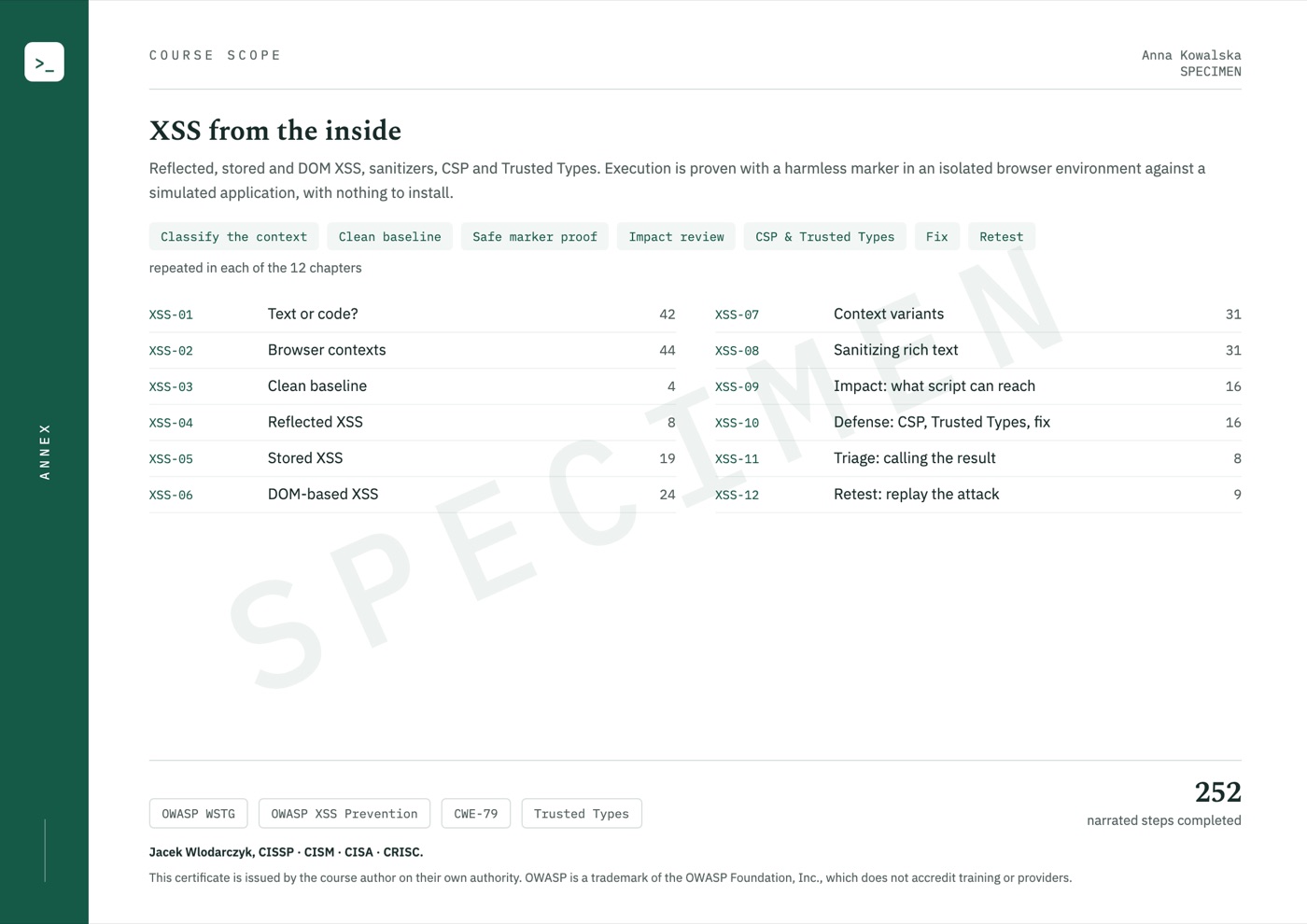
Compare a value returned directly in a response, content stored for later display and data processed by a DOM script. Identify the source and sink for each variation. Build a test matching the actual data path.
Tutor-guided exercise
Start with ordinary content, then use a marker showing execution in an isolated browser exercise. Compare it with mere text reflection and a blocked attempt. Record the role, context and observation without retrieving passwords, tokens or private data.
Tutor-guided exercise
Trace a customer's ticket as it is later displayed to a support agent. Distinguish saving the message from the recipient opening it. Prepare a test showing whose context produces the effect and why that person's role matters.
Tutor-guided exercise
Analyze the flow from a URL fragment and postMessage to a page-modifying operation. Check message origin, structure and safe API selection. Compare innerHTML with inserting a value as text.
Tutor-guided exercise
Practice a case where the application must retain bold text or links but remove dangerous constructs. Compare sanitization rules with the DOM created by the browser. Include allowed link protocols and tests of legitimate formatting.
Tutor-guided exercise
Determine which state and functions a script can reach in the tested context. Distinguish cookie reading from acting with an automatically attached session. Describe the impact on the specific application without assigning identical consequences to every XSS.
Case analysis
Compare CSP blocking execution with removing the cause in code. Learn the role of Trusted Types and a safe value-creation policy. Check which protection acted in each variation and what still needs fixing.
Case analysis
Choose encoding for the display context, safe DOM operations for plain text and sanitization for allowed HTML. Compare vulnerable and corrected code. Check that the change removes the cause instead of blocking only one input example.
Tutor-guided exercise
Analyse the supplied expected retest outcomes for search, saved messages, DOM previews and rich text. These are modelled outcomes, not observations from application tests run again. Plan the missing tests, including checks that legitimate functionality still works after the fix.
Workshop with prepared data
In practice
Each case has context, a concrete action and an outcome. The goal is not to memorize a command but to understand why the result changed.
Trace a ticket through the application model, from submission to display to a support agent. Compare the supplied expected outcomes before and after the fix, and plan a test in the recipient's session. The model does not run that test.
Work productAn explanation of the modelled stored XSS case and a plan for execution and regression tests in the recipient's session.
Analyse data reaching the DOM and the requirements for allowed formatting. Choose a safe API or sanitisation and plan tests for dangerous input and valid content. Separately, test a selected marker in an isolated browser environment. That test does not verify the sanitisation mechanism used by the application.
Work productA context matrix and tests covering both protection and feature usability.
Certificate of completion
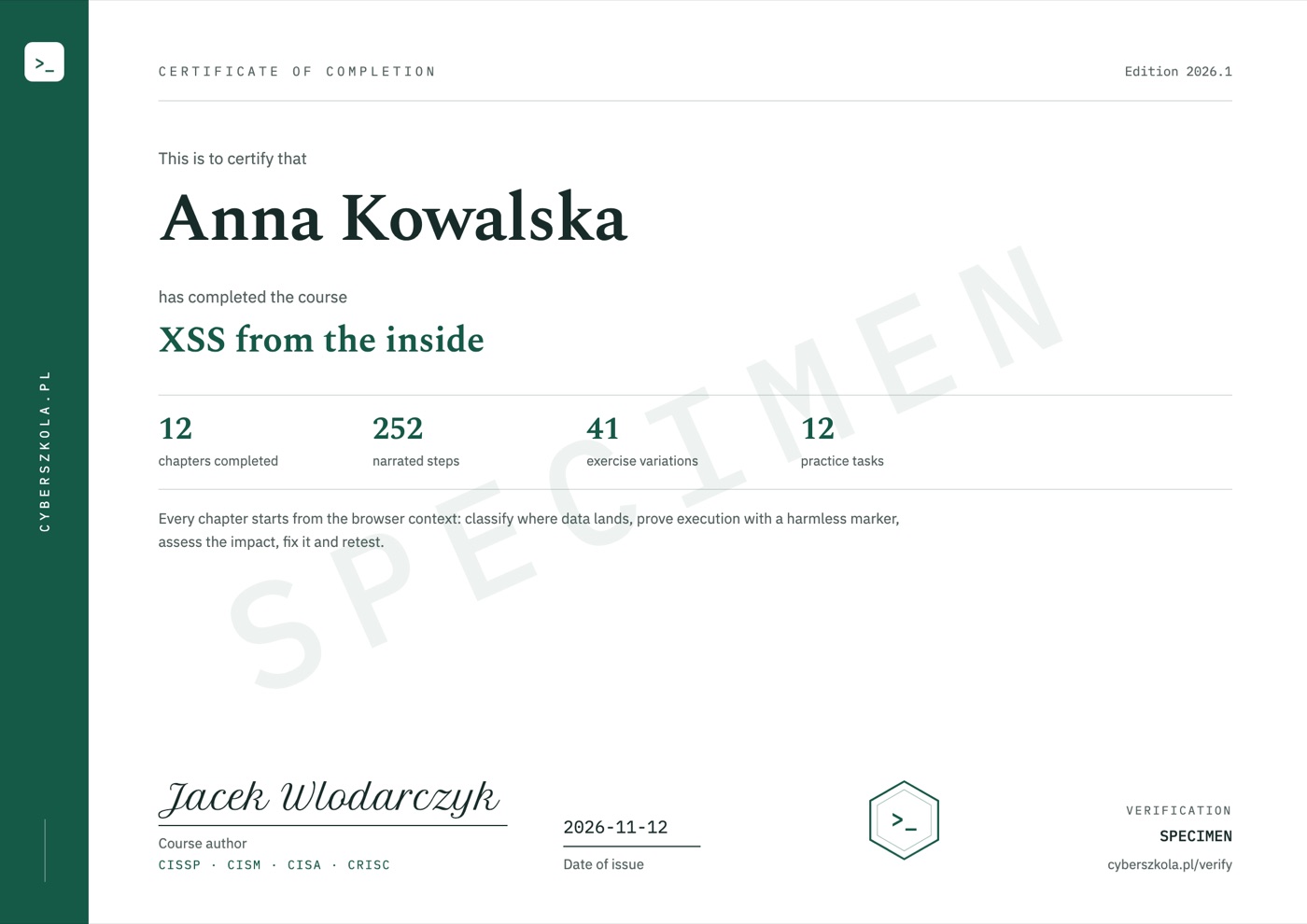
When you complete the course, the certificate is issued automatically and emailed to you. It shows your name, the date of issue and a unique code, and its second page lists the course scope.
Code verification: cyberszkola.pl/verify
Upcoming standalone course
Planned course price
Polish edition · Launch date not yet announced
Notify me at launchJoining is free. Before sales open, you will receive the date, full scope and purchase terms. We are not taking payments today. This is a separate interest list, not a place reservation or purchase.
For companies and teams
Compatible with LMS platforms including:
and other platforms that support e-learning standards.
Price for companies
Delivery into your company's own LMS from 50 licences.
Ask for a quoteWrite to kontakt@cyberszkola.pl: the number of people, the courses you want and your LMS, if you use one.

Project author
Creator of Cyberwiedza, cyberszkola and AI SecLabs. In these courses, I connect explanations of mechanisms with practice, observation and decisions you need to justify.
Running a command is not enough. What matters is what its output confirms, what it does not confirm and what the next step should be.
More about the authorBefore joining
Examples are a starting point for identifying the context and choosing a test. In an isolated browser environment, test actual execution of a harmless marker. The retest workshop instead uses supplied expected outcomes: learn to plan verification of the fix, without performing a full application retest.
Basic understanding of HTML, variables, functions and page modification will help. The course explains data flow and DOM operations but does not replace an introduction to JavaScript programming.
No. This is an upcoming course announcement and an interest list. Joining is not a purchase, a place reservation or a commitment to pay.
The launch date, price and access terms will be announced before sales open. The interest list is how we send that information.
The course is available in Polish and in English — you can switch language at any time, and lessons, exercise explanations and narration exist in both. Commands, code and tool names keep their original syntax, as used in everyday work.
No. All course exercises run in your browser on a computer with internet access. Training applications, terminals, editors and workshops are part of the platform. You do not install Docker, a virtual machine or a VPN, and you do not need paid external tools.
No. You work in an interactive environment. A virtual tutor highlights important elements, and narration explains the action and its result. Pause the lesson, return to earlier steps and run your own experiments. This guidance is built into the course, not individual consultation with a person.
No. You use training applications, simulators and prepared data. Learn the mechanism and its limitations in a safe environment. External resources are supplementary, not required to complete the exercises.
Yes, a certificate of completion. When you complete the course, you receive a certificate in English with a unique code that anyone can check at cyberszkola.pl/verify. It confirms completion of the course and is issued by the author; it is not an industry certification. We do not promise employment.
No. These are independently authored courses using public references and original cases. They do not replace licensed standards, accreditation or qualifications required in regulated industries.
Join the waitlist
Leave your email address. We will send you news of enrollment, the syllabus and first-edition terms. You will not need to keep checking this page.
Planned price: PLN 449 including tax