example.test
DNSwwwAPI
 Illustration of a working environment
Enrolment opening soon
Bash and safe automation
Turn repetitive tasks into small, readable tools. Learn to write Bash scripts that handle arguments, data and errors correctly. Progress from your first file to a CLI interface, cleanup after interruption and tests that help maintain automation.
PLN 349planned price including tax
In your browser · No installation · Tutor and narration
Open your browser. Start learning.
Do not spend your first evening configuring an environment. The application, tools and task context are in one place. You do not need Docker, a VPN, a virtual machine or paid software.
A virtual tutor walks you through the example and highlights important parts of the application, code or tool. Connect the instruction to what is happening on screen.
Narration explains the mechanism, decision and result. Pause the guidance, return to an earlier step and work through it at your own pace.
Take over in the exercise: change data, run a test or make a decision. Compare the result and improve your solution using the explanation.
One environment, without switching between a video and a local installation. Tools fit the topic: from HTTP requests and code to a terminal, calculator or document. Practice in simulators and prepared cases, without attacking other people's systems.
What will you be able to do?
Progress from a command sequence to a script with defined input, output and error behavior.
A script works for one file but fails on spaces or an empty value.
Predict arguments passed to a command and test the script with empty input and unusual filenames.
Automation reports success despite an internal failure.
Trigger an error in the exercise and confirm the correct message, work interruption and removal of temporary resources.
Only the author understands the command sequence.
In the supplied example, test parameter validation, usage information and successful and failing flows. Justify the change and how to check it again.
Use this for repeatable file analysis, data collection and team tools. The course assumes basic terminal confidence.
Connect each skill to a concrete work product. Return to explanations while you practice.
A syllabus backed by materials
See what makes up the syllabus: lessons, explanations, examples and exercises. The figures below describe different types of materials.
The figures describe the English-language source materials. The waiting list is for the planned Polish edition. These counts do not mean its translation is complete. Demonstration steps, examples and tasks are different units, not hours of video or counts of unique vulnerabilities.
Entry point
Available in Polish and English — you can switch language at any time. Command names, code snippets and standard identifiers remain in their original form.
How you learn
The tutor walks through an example and explains each decision. In the exercise, return to the context, check the result and improve your answer.
Goal, constraints and inputs. Know what you are testing and why.
Watch a demonstration with tutor commentary, step by step.
Work with data, a tool or a scenario. Compare the result with your expectation.
Justify your decision and understand its limitations. Return to anything that needs improvement.
Exercises use simulators and selected mechanisms that run in the browser. They do not require attacking other people's systems.
Planned syllabus
Each area develops a specific skill. Learn not only the topic but also the action and outcome that learning leads to.
Each topic includes a skill and a concrete exercise outcome.
I want to join the listClarify the difference between a terminal window, shell process and executed command. Review navigation, file reading and searching. Prepare a context in which launching a script has predictable meaning.
Tutor-guided exercise
Write a small script, specify its interpreter and compare invoking Bash with executing the file by path. Check permissions, stdout, stderr and exit code. Distinguish saving a file from actually running it.
Tutor-guided exercise
See how the shell splits text into words and expands unquoted values. Compare spaces, empty arguments, wildcards and option-like names. Fix the command so data reaches the program as intended.
Tutor-guided exercise
Practice shell variables, export, PATH and sourcing a file. Check which values a child process sees and which stay local. Explain how startup files and the current directory affect the script.
Tutor-guided exercise
Use indexed and associative arrays to store multiple values. Preserve empty elements and names with spaces when passing arguments. Compare brace expansion with filename globbing.
Tutor-guided exercise
Practice default parameter values, string operations, arithmetic and command substitution. Learn process substitution and expansion order. Choose a construct for text, numbers or program input.
Tutor-guided exercise
Combine redirections, here-documents, pipelines and command chains. Check order effects and read component statuses. Distinguish displayed text from evidence that all required operations succeeded.
Tutor-guided exercise
Treat a condition as a command with an exit code. Compare test brackets, shell patterns, regular expressions and case. Build clear handling of valid input and expected errors.
Tutor-guided exercise
Split a script into small functions with arguments and explicit results. Practice loops that preserve list boundaries and local variables. Distinguish function output from execution status.
Tutor-guided exercise
Use read -r, mapfile and printf with lines, fields and special characters. Preserve backslashes and empty values and direct diagnostics separately. Prepare output suitable for further processing.
Tutor-guided exercise
Analyze options, positional arguments and help text in a supplied example. Practice getopts, select, shift and unknown-option handling. Check input, output and error rules, then justify necessary fixes.
Tutor-guided exercise
Plan ownership of temporary files and child processes. Use waiting and trap signal handling for controlled termination. Learn about concurrency, coprocesses and scheduled-task context.
Demonstration with explanation
Compare syntax checks, xtrace tracing, static analysis and execution tests. Check shell options and recognize Bash-specific constructs. History, completion and customization remain aids, not hidden script requirements.
Tutor-guided exercise
Analyze filenames, URLs, parameters and transfer destinations as inputs. Check risks from command construction and eval. Network and host examples retain their stated execution or reference scope.
Case analysis
Separate presentation from data, limit hidden state and organize messages. Use color only where it does not disrupt downstream processing. Prepare small functions and explicit conditions that are easy to test and change.
Case analysis
Combine learned constructs into a Northstar tool. Prepare test data, failure cases, repeat-run checks and CI conditions. Hand over the script with interpreter details and evidence of performed tests.
Workshop with prepared data
In practice
Each case has context, a concrete action and an outcome. The goal is not to memorize a command but to understand why the result changed.
Analyze a supplied script with options and arguments. Test names with spaces, invalid input and separation of output from error messages. Justify a fix and how to check it again.
Work productA comparison of valid and invalid invocations and a justified fix to an example CLI.
Prepare temporary-file and child-process handling and interruption cleanup. Check pipeline statuses, waiting and repeat runs, and connect results to tests.
Work productAn automation scenario with error checks, cleanup and a verification record.
Certificate of completion
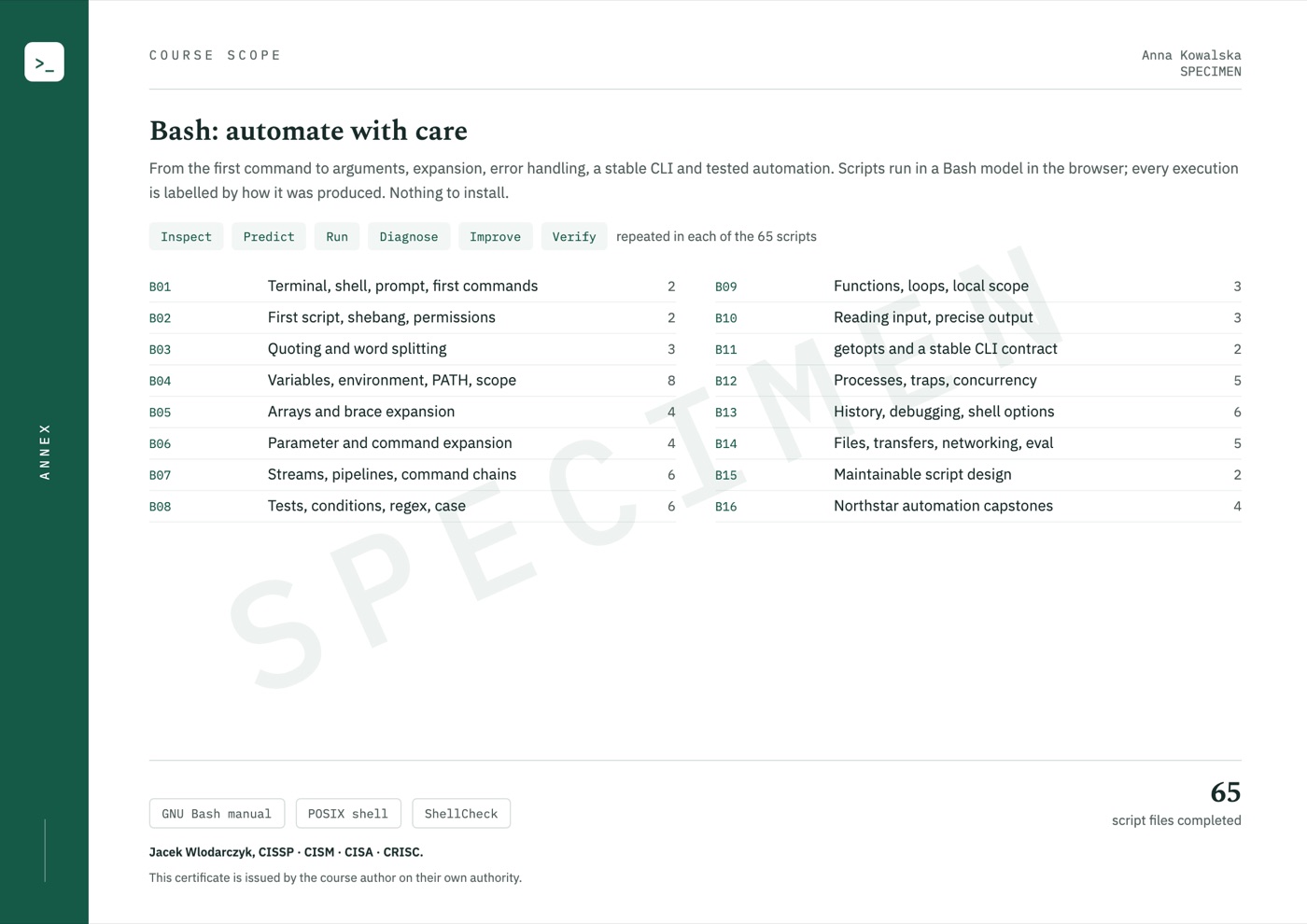
When you complete the course, the certificate is issued automatically and emailed to you. It shows your name, the date of issue and a unique code, and its second page lists the course scope.
Code verification: cyberszkola.pl/verify

Upcoming standalone course
Planned course price
Polish edition · Launch date not yet announced
Notify me at launchJoining is free. Before sales open, you will receive the date, full scope and purchase terms. We are not taking payments today. This is a separate interest list, not a place reservation or purchase.
For companies and teams
Compatible with LMS platforms including:
and other platforms that support e-learning standards.
Price for companies
Delivery into your company's own LMS from 50 licences.
Ask for a quoteWrite to kontakt@cyberszkola.pl: the number of people, the courses you want and your LMS, if you use one.

Project author
Creator of Cyberwiedza, cyberszkola and AI SecLabs. In these courses, I connect explanations of mechanisms with practice, observation and decisions you need to justify.
Running a command is not enough. What matters is what its output confirms, what it does not confirm and what the next step should be.
More about the authorBefore joining
You need confidence with navigation, files, commands and simple pipelines, not completion of a specific course. If these topics are new, Linux from the basics is suitable preparation.
No. Syntax supports tools with correct arguments, clear errors and predictable termination. Cases also cover testing, maintainability and repeatable execution.
No. This is an upcoming course announcement and an interest list. Joining is not a purchase, a place reservation or a commitment to pay.
The launch date, price and access terms will be announced before sales open. The interest list is how we send that information.
The course is available in Polish and in English — you can switch language at any time, and lessons, exercise explanations and narration exist in both. Commands, code and tool names keep their original syntax, as used in everyday work.
No. All course exercises run in your browser on a computer with internet access. Training applications, terminals, editors and workshops are part of the platform. You do not install Docker, a virtual machine or a VPN, and you do not need paid external tools.
No. You work in an interactive environment. A virtual tutor highlights important elements, and narration explains the action and its result. Pause the lesson, return to earlier steps and run your own experiments. This guidance is built into the course, not individual consultation with a person.
No. You use training applications, simulators and prepared data. Learn the mechanism and its limitations in a safe environment. External resources are supplementary, not required to complete the exercises.
Yes, a certificate of completion. When you complete the course, you receive a certificate in English with a unique code that anyone can check at cyberszkola.pl/verify. It confirms completion of the course and is issued by the author; it is not an industry certification. We do not promise employment.
No. These are independently authored courses using public references and original cases. They do not replace licensed standards, accreditation or qualifications required in regulated industries.
Join the waitlist
Leave your email address. We will send you news of enrollment, the syllabus and first-edition terms. You will not need to keep checking this page.
Planned price: PLN 349 including tax