

Materials and tools used in a security reviewIllustration of a working environment

Enrolment opening soon

Recon: from lead to evidence

Recon and terminal-based evidence

Learn reconnaissance and log analysis that preserves where every result came from. Combine terminal commands, data filtering, HTTP observations and integrity checks into a clear package for a reviewer or client.

PLN 349planned price including tax

In your browser · No installation · Tutor and narration

FormatIn your browser, at your own pace
Syllabus11 topic areas
Edition languagePolish
Signup typeFree waitlist

Recon: from lead to evidence

Join the waitlist

Have a question? Email me

You can withdraw your consent at any time. This signup covers the selected course — we will not add you to the lists for the other courses automatically.

Open your browser. Start learning.

The tutor shows you.
The narrator explains. You practice.

Do not spend your first evening configuring an environment. The application, tools and task context are in one place. You do not need Docker, a VPN, a virtual machine or paid software.

See what to pay attention to

A virtual tutor walks you through the example and highlights important parts of the application, code or tool. Connect the instruction to what is happening on screen.

Hear why the result matters

Narration explains the mechanism, decision and result. Pause the guidance, return to an earlier step and work through it at your own pace.

Test your own reasoning

Take over in the exercise: change data, run a test or make a decision. Compare the result and improve your solution using the explanation.

One environment, without switching between a video and a local installation. Tools fit the topic: from HTTP requests and code to a terminal, calculator or document. Practice in simulators and prepared cases, without attacking other people's systems.

What will you be able to do?

Turn observations into reproducible evidence.

Do not stop at command output. Preserve its context and prepare material someone else can check.

Starting point

Tool results disappear into files with no context.

The skill you develop

Organize records of actions, identities, times and sources.

How you test it in practice

Reconstruct which command ran with which input. Separate source files from working extracts.

Starting point

You have a request and a log but do not know whether they describe the same event.

The skill you develop

Connect observations through identifiers and a timeline.

How you test it in practice

Identify the entry corresponding to the test and what it confirms. Mark missing data instead of inventing the sequence.

Starting point

The report receives an entire folder or a terminal screenshot.

The skill you develop

Select necessary material and remove unnecessary data from the delivery copy.

How you test it in practice

Prepare an evidence index, an organized package and instructions for checking the finding again.

Why does this matter beyond the course?

Develop skills for reconnaissance, log analysis and handing evidence over for review. A discovered resource remains a lead until verified.

Connect each skill to a concrete work product. Return to explanations while you practice.

A syllabus backed by materials

Specific topics.
Practice that helps you understand them.

See what makes up the syllabus: lessons, explanations, examples and exercises. The figures below describe different types of materials.

12chapters
Topic chapters in the current course materials. Subviews and indexes of the same content do not increase this count.
277narrated steps
Distinct pairs of screen text and narration after removing identical duplicates. These are guidance segments, not separate complete lessons.
66exercise variations
16 cases and 50 levels working with commands and evidence. This does not mean 66 real network scans.
50exercise levels
Exercise levels already included in the 66 variations. These two values must not be added together.

The figures describe the English-language source materials. The waiting list is for the planned Polish edition. These counts do not mean its translation is complete. Demonstration steps, examples and tasks are different units, not hours of video or counts of unique vulnerabilities.

Entry point

Who is this course for?

  • Pentesters and analysts who already use the terminal and want to organize the entire assessment workflow.
  • People who collect many results and want to document their provenance better.

What helps at the start

  • Basic terminal use and understanding of URLs.

Available in Polish and English — you can switch language at any time. Command names, code snippets and standard identifiers remain in their original form.

How you learn

First, understand.
Then, do it yourself.

The tutor walks through an example and explains each decision. In the exercise, return to the context, check the result and improve your answer.

  1. Understand the situation

    Goal, constraints and inputs. Know what you are testing and why.

  2. See the mechanism

    Watch a demonstration with tutor commentary, step by step.

  3. Complete the task

    Work with data, a tool or a scenario. Compare the result with your expectation.

  4. Draw a conclusion

    Justify your decision and understand its limitations. Return to anything that needs improvement.

Exercises use simulators and selected mechanisms that run in the browser. They do not require attacking other people's systems.

Planned syllabus

Know what you are learning. And why.

Each area develops a specific skill. Learn not only the topic but also the action and outcome that learning leads to.

Each topic includes a skill and a concrete exercise outcome.

I want to join the list
01Working environment

Establish the user, working directory, time and tool versions before analysis. Prepare a directory structure and activity log. Command records will then carry the context needed to explain the output.

Tutor-guided exercise

What you practice
Organize work to preserve the context of every result.
Practical outcome
Organize the case directory, source files and working files. Record which action was performed on which data.
02Reading and searching files

Choose whole-file, partial or numbered-line views to suit the material's size. Practice filename patterns, content search and argument quoting. Also check hidden files and case-sensitive differences.

Tutor-guided exercise

What you practice
Find the relevant material without manually reading everything.
Practical outcome
Search prepared files and inspect surrounding entries. Distinguish no match from no event.
03Pipelines and log analysis

Combine grep, sort, uniq, cut and awk to analyze paths and events. Trace stdout, stderr, overwriting and appending output. Prepare a readable log extract while preserving the input material.

Tutor-guided exercise

What you practice
Combine filtering and data transformation into a clear analysis.
Practical outcome
Build a summary from a log and compare it with source entries. Explain what each stage discarded.
04Identity and permissions

Read users, groups and file modes, including special permission bits. Record the state before and after a change. Choose minimal access to the material instead of simplifying work with excessive permissions.

Tutor-guided exercise

What you practice
Consider the user and file access when interpreting results.
Practical outcome
Check execution context and permissions. Distinguish lack of access, a missing resource and a command error.
05Reconnaissance within scope

Translate engagement scope into allowed sources and commands. Compare supplied public reconnaissance results with authorized service validation. Ask about newly discovered resources when authorization does not settle whether they may be tested.

Tutor-guided exercise

What you practice
Choose reconnaissance within the approved assessment boundary.
Practical outcome
Compare discovered resources with scope. Identify which leads can be tested and which need additional agreement.
06Recording HTTP results

Preserve headers, response bodies and exact requests. Compare an interesting path's result with a nonexistent resource to identify a soft 404 false positive. Identify observations that justify further analysis.

Tutor-guided exercise

What you practice
Preserve the data needed to repeat a specific HTTP test.
Practical outcome
Connect the request to the response, time and test identity. Distinguish the result from merely running a tool.
07Log correlation

Connect entries from different logs through request identifier, user and time. Build an event timeline and verify context consistency. Distinguish what the application confirms from assumptions based only on nearby timestamps.

Tutor-guided exercise

What you practice
Check whether observations from different sources concern the same event.
Practical outcome
Match the request identifier and time to the log. Identify a missing link instead of inventing the sequence.
08Files and integrity

Record metadata and file hashes and build a manifest. Verify consistency after copying or archiving. Connect byte changes to file provenance so the recipient knows what they received.

Tutor-guided exercise

What you practice
Verify material consistency and preserve provenance.
Practical outcome
Compare checksums and file identifiers. Explain why matching hashes do not prove content truth.
09Redaction and sharing

Preserve the original and prepare a separate recipient copy. Remove unnecessary secrets and data while retaining what explains the finding. Label source and redacted files.

Tutor-guided exercise

What you practice
Minimize shared data while preserving useful evidence.
Practical outcome
Work on a copy and remove unnecessary secrets. Check that the remaining context supports assessment of the finding.
10Retest

Prepare request-reproduction commands and explicit success or failure conditions. Check rejection of unauthorized operations and preservation of legitimate functionality. Record results so success follows from verification, not merely script completion.

Workshop with prepared data

What you practice
Repeat a test under comparable conditions after a system change.
Practical outcome
Compare results before and after the fix. Record the version, differences and a control for legitimate operation.
11Handover

Assemble an archive with a timeline, report copy, contents index and retest commands. Check the delivered file's hash and describe each material's purpose. Give the recipient an organized assessment record, not an unlabeled folder.

Workshop with prepared data

What you practice
Prepare material another person can verify.
Practical outcome
Organize the evidence index, action descriptions and limitations. Explain how to reproduce the conclusion without guessing file provenance.

In practice

What will you work on
during the course?

Each case has context, a concrete action and an outcome. The goal is not to memorize a command but to understand why the result changed.

Reconstructing a request from logs

Find relevant lines, prepare filters and connect identifiers with time and user. Compare sources to establish what is actually known about data access.

Work productAn event timeline and log extract linked to the finding description.

An evidence package ready for review

Preserve raw material, prepare a redacted copy and manifest. Include retest commands with explicit assessment conditions, then verify the delivery archive's integrity.

Work productAn organized archive, contents index and retest scenario.

Certificate of completion

Finish the course.
Get the certificate.

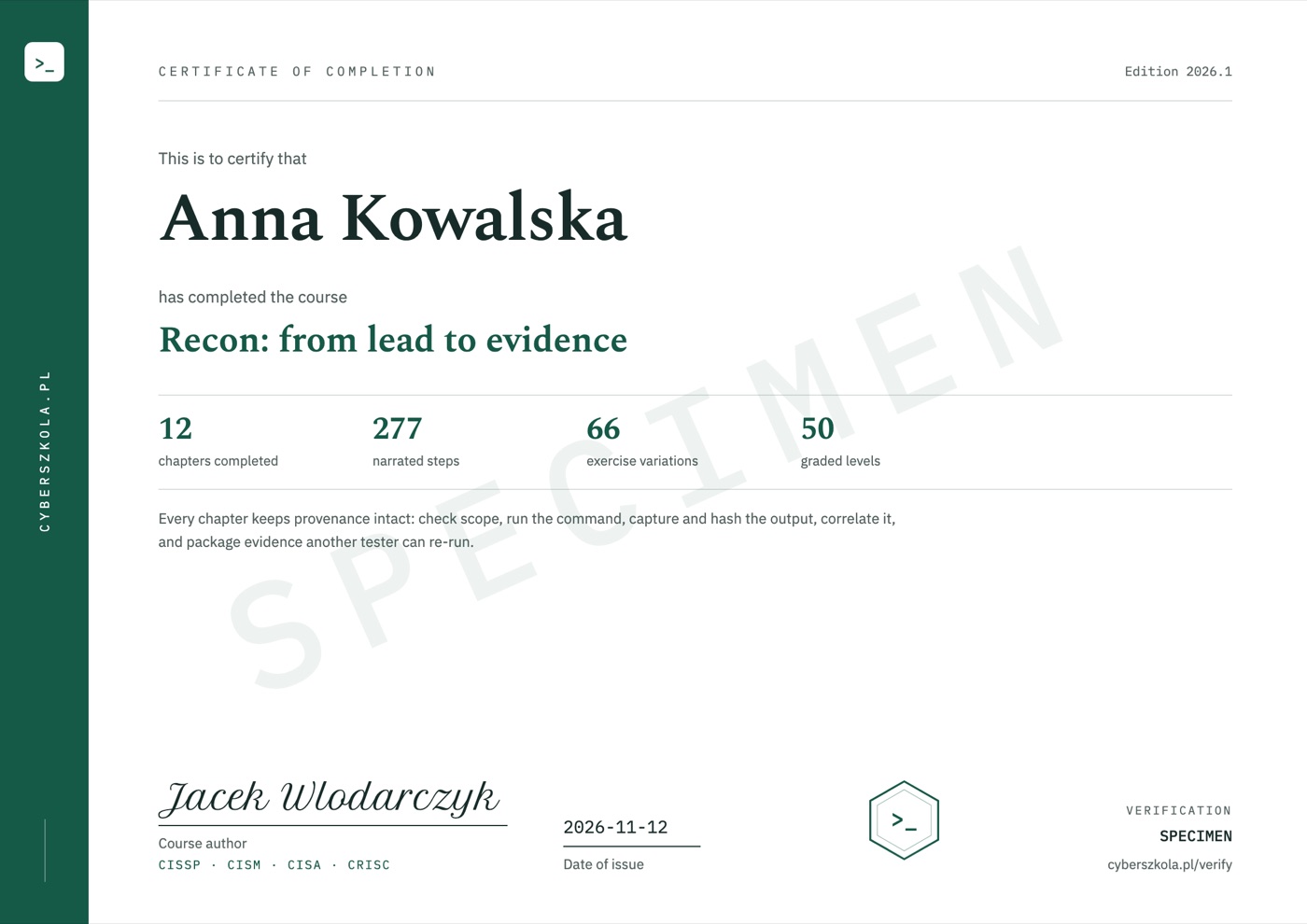
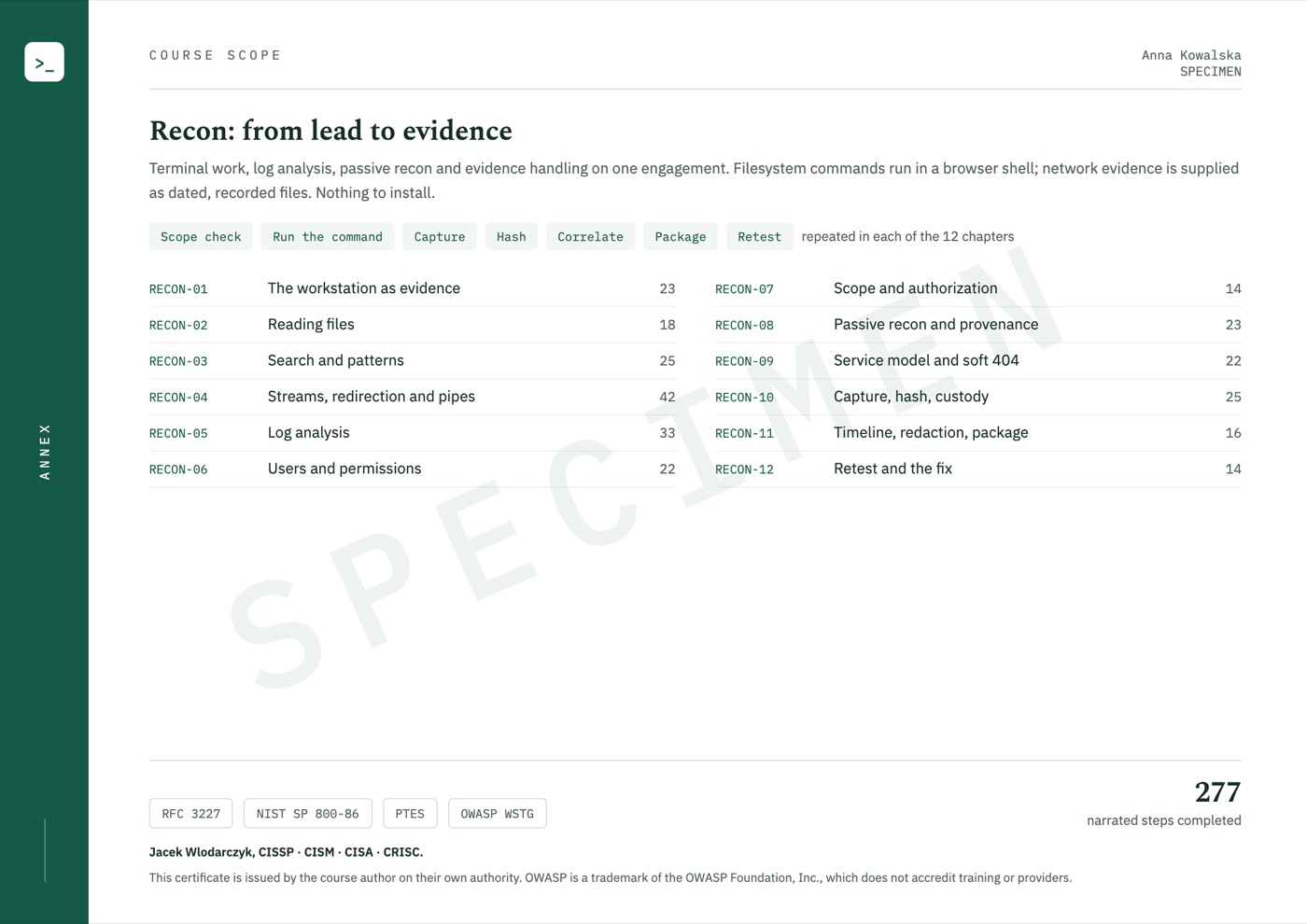
When you complete the course, the certificate is issued automatically and emailed to you. It shows your name, the date of issue and a unique code, and its second page lists the course scope.

  • Anyone, such as an employer, can check the code without logging in.
  • The certificate is issued in English.
  • It confirms completion of the course; it is not an industry certification.

Code verification: cyberszkola.pl/verify

Sample certificate of completion, page 1, with example details and a SPECIMEN watermark
Sample certificate, page 2: course scope
Sample certificate: page 1 and the course scope on page 2. The name, date and code are examples.
Enlarge course scope
Sample certificate, page 2: course scope

Upcoming standalone course

A defined scope.
Without buying the whole path.

  • Data for analyzing logs, HTTP results and resource reconnaissance.
  • Exercises in pipelines, searching, redaction and hash verification.
  • A case connecting observation, source description, packaging and handover.
  • Certificate of completion in English, with a verification code.

Planned course price

PLN 349including tax

Polish edition · Launch date not yet announced

Notify me at launch

Joining is free. Before sales open, you will receive the date, full scope and purchase terms. We are not taking payments today. This is a separate interest list, not a place reservation or purchase.

For companies and teams

Training for your team.
On our platform or in your LMS.

  • Company accounts, departments and licences on our platform, with progress reports for managers.
  • Delivery into your company's e-learning system. Progress and completion show up in your own reports.
  • VAT invoice issued to your company.

Compatible with LMS platforms including:

  • Moodle
  • TalentLMS
  • Cornerstone
  • Docebo
  • SAP SuccessFactors
  • Workday Learning
  • Absorb
  • 360Learning

and other platforms that support e-learning standards.

Price for companies

Individual quotedepends on the number of licences, access period and delivery method

Delivery into your company's own LMS from 50 licences.

Ask for a quote

Write to kontakt@cyberszkola.pl: the number of people, the courses you want and your LMS, if you use one.

Jacek Wlodarczyk

Project author

Jacek Wlodarczyk

Creator of Cyberwiedza, cyberszkola and AI SecLabs. In these courses, I connect explanations of mechanisms with practice, observation and decisions you need to justify.

Running a command is not enough. What matters is what its output confirms, what it does not confirm and what the next step should be.

More about the author

Before joining

Good to know.

How is this different from the Linux course?

Linux builds general terminal confidence. This course uses commands for a specific process: reconnaissance, log analysis, source preservation and evidence handover. Basic file navigation knowledge is useful beforehand.

Is the course useful beyond pentesting?

Yes. Log filtering, file provenance and reproducible records also help incident analysis and troubleshooting. Course cases remain focused on security assessments.

Am I buying a course now?

No. This is an upcoming course announcement and an interest list. Joining is not a purchase, a place reservation or a commitment to pay.

When will it launch, and what will it cost?

The launch date, price and access terms will be announced before sales open. The interest list is how we send that information.

What language will the course use?

The course is available in Polish and in English — you can switch language at any time, and lessons, exercise explanations and narration exist in both. Commands, code and tool names keep their original syntax, as used in everyday work.

Do I need to install Docker, a VPN or my own lab?

No. All course exercises run in your browser on a computer with internet access. Training applications, terminals, editors and workshops are part of the platform. You do not install Docker, a virtual machine or a VPN, and you do not need paid external tools.

Is this just a collection of videos?

No. You work in an interactive environment. A virtual tutor highlights important elements, and narration explains the action and its result. Pause the lesson, return to earlier steps and run your own experiments. This guidance is built into the course, not individual consultation with a person.

Do the exercises act on other people's systems?

No. You use training applications, simulators and prepared data. Learn the mechanism and its limitations in a safe environment. External resources are supplementary, not required to complete the exercises.

Will I receive a certificate or a job guarantee?

Yes, a certificate of completion. When you complete the course, you receive a certificate in English with a unique code that anyone can check at cyberszkola.pl/verify. It confirms completion of the course and is issued by the author; it is not an industry certification. We do not promise employment.

Are these official OWASP or ISO courses?

No. These are independently authored courses using public references and original cases. They do not replace licensed standards, accreditation or qualifications required in regulated industries.

Join the waitlist

Do not miss the launch: Recon: from lead to evidence

Leave your email address. We will send you news of enrollment, the syllabus and first-edition terms. You will not need to keep checking this page.

Planned price: PLN 349 including tax

  • Launch news for your chosen course
  • The full offer before you decide to buy
  • Free to join, no obligation to buy

Join the waitlist

Have a question? Email me

You can withdraw your consent at any time. This signup covers the selected course — we will not add you to the lists for the other courses automatically.