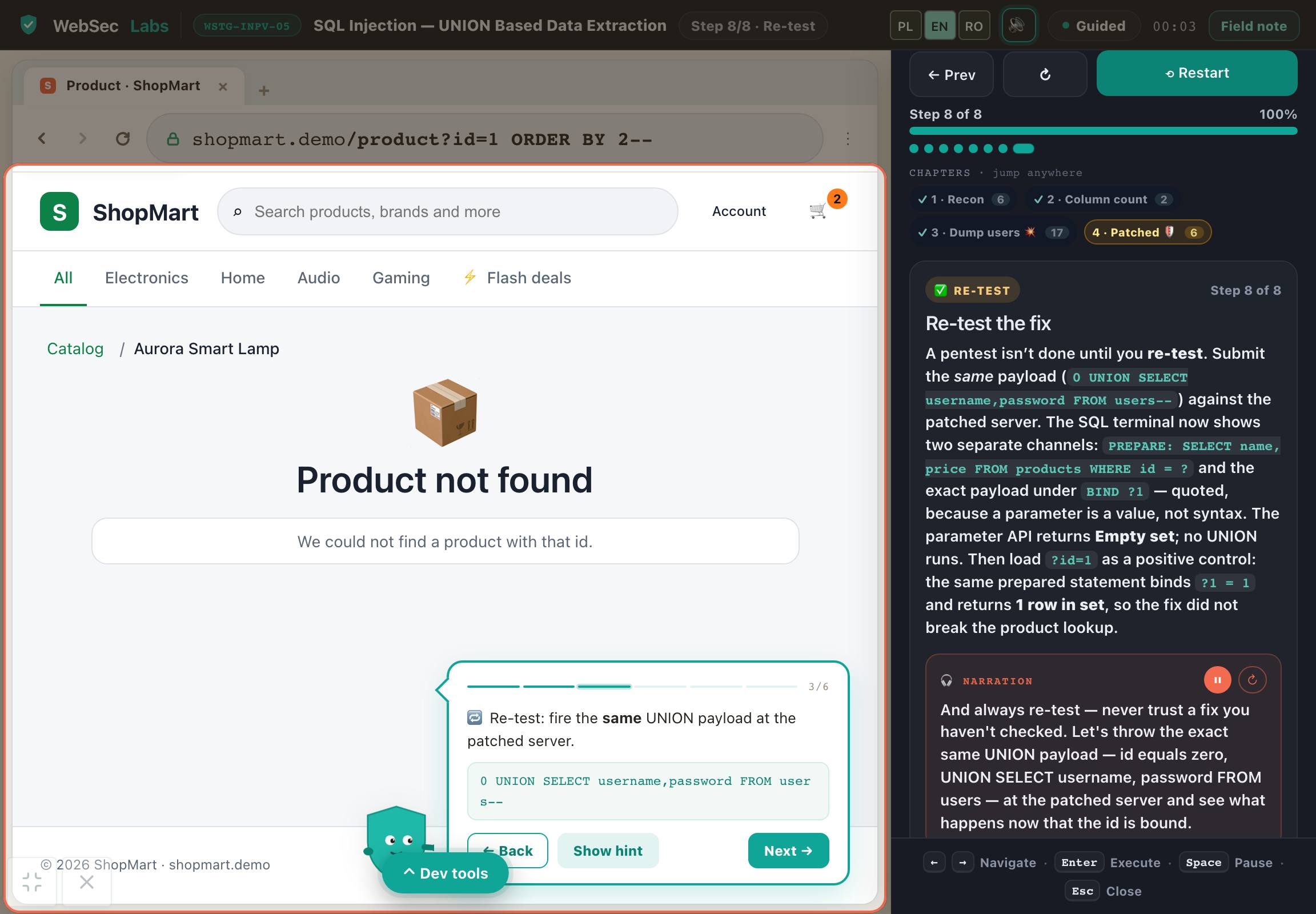
Demo screenshot: SQL injection UNION: pełne laboratorium ShopMartSee the working demo ↓A screenshot — the working demo is below

Polish edition · Waitlist

Web Security PRO

Web application security

Stop guessing what a payload does. In 132 labs, learn why vulnerabilities occur, change requests and compare results. A tutor and narration guide you through the example, then you test your own variations. Everything runs in your browser, with no installation.

PLN 790planned price including tax

In your browser · No installation · Tutor and narration

technical labs132
exercise stages1,056
narrated steps3,169
test variations1,511
Planned startNovember 2026

Web Security PRO

Join the waitlist

Have a question? Email me

You can withdraw your consent at any time. This signup covers the selected course — we will not add you to the lists for the other courses automatically.

Look inside

Try the course in practice.

UNION SQL injection: the full ShopMart lab

Web Security PRO / full lab

The demo includes a complete lab

1 full lab. The course contains 132.

Full course: Web Security PRO

technical labs
132
exercise stages
1056
narrated steps
3169
test variations
1511
Join the waitlist

We will notify you when the full course launches. No obligation to buy.

Counts describe the program's current source material. Test variants include attacks, controls and models, not only exploits. Different types of material are not added together.

What does the demo include, and what comes next?

This is the complete UNION SQL injection lab: 31 tutor steps, 8 stages and 18 Sandbox variations. Trace a product parameter from the HTTP request to the SQL query, see the exposed data and test a parameterized fix.

  • Explore further SQL injection techniques and other vulnerability classes, including XSS, session flaws and access-control issues.
  • Connect the changed parameter to the query and application response, and explain the cause of the result.
  • Compare vulnerable and protected versions and run your own experiments in the labs.

One full WSTG lab with Sandbox in its original exercise environment. This is 1 of the first edition's 132 labs. Separate professional-practice modules are not part of this offer.

View the full syllabus

Open your browser. Start learning.

The tutor shows you.
The narrator explains. You practice.

Do not spend your first evening configuring an environment. The application, tools and task context are in one place. You do not need Docker, a VPN, a virtual machine or paid software.

See what to pay attention to

A virtual tutor walks you through the example and highlights important parts of the application, code or tool. Connect the instruction to what is happening on screen.

Hear why the result matters

Narration explains the mechanism, decision and result. Pause the guidance, return to an earlier step and work through it at your own pace.

Test your own reasoning

Take over in the exercise: change data, run a test or make a decision. Compare the result and improve your solution using the explanation.

One environment, without switching between a video and a local installation. Tools fit the topic: from HTTP requests and code to a terminal, calculator or document. Practice in simulators and prepared cases, without attacking other people's systems.

What will you be able to do?

From a copied payload to understanding the result.

This is not about getting through another screen. Learn to identify inputs, choose a test and explain why it changed the application's behavior.

Starting point

You see a form but do not know what data the application actually receives.

The skill you develop

Connect a user's action to a request and response.

How you test it in practice

Identify the parameter, account and resource. Perform a normal operation before changing the input for an attack attempt.

Starting point

You know the flaw's name or a payload but cannot tell whether the result proves anything.

The skill you develop

Design a comparison, confirm the flaw in the lab and explain its cause.

How you test it in practice

Compare normal behavior with an unauthorized-access attempt. Record reproduction conditions, the actual effect and the limits of your conclusion.

Starting point

After changing a protection, you only check whether the error disappears.

The skill you develop

Compare an attack attempt with an allowed operation.

How you test it in practice

In the lab's protected version, verify both that the unauthorized operation is blocked and that an authorized user retains access.

Why does this matter beyond the course?

Use this way of thinking in further AppSec learning and authorized testing: distinguish observation from assumption and identify conditions worth checking. The first edition develops technical skills; it does not replace preparation for managing an entire engagement.

Connect each skill to a concrete work product. Return to explanations while you practice.

Suggested learning sequence

You do not start
with 132 open tabs.

Start with one case and understand its result. Then explore more application mechanisms and attack variations. The catalog is a source of practice, not a checklist to finish in one weekend.

  1. Full UNION SQL injection demo

    Start with one case

    Connect the product parameter, HTTP request and SQL query. Compare a normal result with an attack attempt, then test the fix.

  2. Authorization and data isolation

    Compare access for two users

    Change one identifier, compare responses and explain whether another user's data was exposed.

  3. Authentication and sessions

    Trace the session and login

    Test how the application identifies an account, maintains a session and ends access.

  4. SQL injection and XSS

    See when data changes an instruction

    Connect input data to its interpretation in a query or browser.

  5. Exercise variations and control tests

    Repeat the test after enabling protection

    Verify the expected block and a legitimate operation. Then choose another vulnerability class from the catalog.

Your starting point

Basic IT knowledge and familiarity with web applications will help. Code examples require basic HTML and JavaScript. Start with the free demo to check the level and learning experience. You do not need to buy a separate specialist course.

A syllabus backed by materials

Specific topics.
Practice that helps you understand them.

See what makes up the syllabus: lessons, explanations, examples and exercises. The figures below describe different types of materials.

132technical labs
Local labs cover WSTG topics and curriculum extensions. This counts labs, not distinct objectives of the standard.
1056exercise stages
Stages within technical labs. They organize the exercise flow and are not additional labs or separate hours of learning.
3169narrated steps
Distinct text and narration segments guide you through the technical labs, excluding PRO modules. Identical text-and-narration pairs are counted only once.
1511test variations
Distinct test configurations after removing duplicates. They include attack examples, control tests and models, not only working exploits.

The figures describe the current materials. Demonstration steps, examples and tasks are different units, not hours of video or counts of unique vulnerabilities.

132 technical labs

More than XSS and SQL injection.
The whole application surface.

The syllabus covers all 12 application-testing areas in WSTG 4.2, from reconnaissance to APIs. We extend it with further protocol, token, cache and AI-application scenarios. Every lab topic is listed below.

Labs: 132 of 132

Application reconnaissanceFind entry points, identify technologies and decide what to investigate next.10

Lab topics

  • Search engines and publicly exposed information
  • Server fingerprinting through headers and errors
  • robots.txt, sitemaps and exposed paths
  • Finding applications on a shared server
  • Source code and information left in the application
  • Parameter and entry-point map
  • User flows and execution paths
  • Framework fingerprinting
  • Application and component fingerprinting
  • Architecture and dependency map
Configuration and deploymentCheck whether configuration, files or caching create an attack opportunity.16

Lab topics

  • Network infrastructure configuration
  • Application platform configuration
  • Extension handling and file disclosure
  • Backup and forgotten files
  • Access to administrative interfaces
  • HTTP methods and unintended operations
  • HSTS and enforcing secure connections
  • Cross-domain access policies
  • File permissions
  • Abandoned subdomain takeover
  • Cloud storage misconfiguration
  • Content Security Policy and bypasses
  • Cache poisoning
  • Web cache deception and private response disclosure
  • Differences in path interpretation between cache and application
  • Security headers and their actual role
Identity and user accountsAnalyze roles, account creation and information the application reveals about users.5

Lab topics

  • Incorrectly defined roles
  • Registration process flaws
  • Account provisioning and access grants
  • Account enumeration
  • Predictable usernames
Login and account recoveryExamine the full authentication lifecycle: passwords, MFA, remember-me features and access recovery.11

Lab topics

  • Transmission of login credentials
  • Default passwords and accounts
  • Password attacks and attempt blocking
  • Authentication bypass
  • Remember-me feature security
  • Authenticated user data in the browser cache
  • Weak passwords and HTTP Basic Authentication
  • Security questions
  • Password reset manipulation
  • Authentication through alternative channels
  • Multi-factor authentication bypass
Permissions and data isolationDistinguish being logged in from being authorized, and test access to other users' data and functions.6

Lab topics

  • Path traversal and access outside the allowed directory
  • Local and remote file inclusion
  • Authorization bypass
  • Privilege escalation through cookie data
  • IDOR and access to another user's resources
  • OAuth and unsafe redirects
Sessions, cookies and tokensTrace session state, test session takeover and check whether logout actually ends access.12

Lab topics

  • Session identifier structure and predictability
  • Cookie security attributes
  • Session fixation
  • Session data exposure
  • CSRF and operations in another user's session
  • Ineffective logout
  • Session timeout bypass
  • Unexpected use of session state
  • Session hijacking
  • JWT manipulation
  • Concurrent sessions and access control
  • JWT algorithm confusion
Input data and injectionTest when data becomes a query, command or code, and how to confirm its effect.31

Lab topics

  • Reflected XSS: reflected input and script execution
  • Stored XSS: a script saved in the application
  • HTTP method tampering
  • Duplicate HTTP parameters
  • SQL injection: login bypass
  • SQL injection: reading data through UNION
  • Blind SQL injection: inference from responses
  • SQL injection: information from database errors
  • Second-order SQL injection
  • NoSQL injection
  • LDAP injection
  • XXE and XML entity processing
  • XInclude injection
  • Server-Side Includes injection
  • XPath injection
  • Mail protocol injection
  • Code injection
  • OS command injection
  • Buffer overflow: mechanism and effects
  • Vulnerability triggered at a later stage
  • HTTP request smuggling
  • HTTP response splitting
  • Differences in HTTP/2 and HTTP/1 interpretation
  • Malformed incoming requests
  • Host header injection
  • Server-Side Template Injection
  • SSRF: server-side requests
  • Insecure deserialization
  • Mass assignment: overwriting unintended fields
  • Server-side prototype pollution
  • Client-side prototype pollution
Errors and information disclosureAssess what error messages reveal about application data, code and configuration.2

Lab topics

  • Information disclosed in error messages
  • Stack traces and implementation details
Cryptography and transportRecognize issues in transport and data protection, and the limits of the mechanisms used.4

Lab topics

  • Weak TLS configuration
  • Padding oracle and ciphertext feedback
  • Unencrypted data transmission
  • Weak encryption mechanisms
Business logic and filesLook for abuse of legitimate features: changing a price, skipping a step or repeating an operation.10

Lab topics

  • Business data validation
  • Forging business-process requests
  • Integrity-check bypass
  • Race conditions and concurrent operations
  • Function-use limit bypass
  • Skipping process stages
  • Application abuse protection
  • Unexpected uploaded file types
  • Uploading files with dangerous content
  • Price and order-value manipulation
Browser securityConnect the DOM, JavaScript and browser policies to the actual execution context.16

Lab topics

  • DOM XSS and JavaScript data flow
  • Unexpected JavaScript execution
  • HTML injection
  • Open redirects
  • CSS injection
  • Client-side resource manipulation
  • CORS misconfiguration
  • Cross-site flashing: a historical technology example
  • Clickjacking and framing applications
  • WebSocket hijacking
  • Unsafe postMessage communication
  • Access to browser storage data
  • Cross-Site Script Inclusion
  • Reverse tabnabbing and control of the source window
  • Dangling markup and capturing page fragments
  • DOM clobbering and overwriting element references
API and GraphQLDiscover interfaces, analyze data structures and test API permissions and limits.5

Lab topics

  • API endpoint reconnaissance
  • Access to API objects without proper authorization
  • GraphQL introspection and schema disclosure
  • Server-side parameter pollution
  • Rate-limit bypass
Extension: AI and LLM applicationsTest how a language model affects application data, permissions and actions.4

Original curriculum extension

  • Unsafe use of model output
  • Abusing a model's API access
  • Excessive model permissions and autonomy
  • Indirect prompt injection

132 is the number of our labs, not the number of official OWASP tests. WSTG 4.2 organizes the topic coverage, with original extensions adding to it. Subtopics include demonstrations, tasks and models, depending on the mechanism.

Know where to look next

An example in the course. A method in WSTG. Further practice at PortSwigger.

Notes connect the topic to a test description and remediation guidance. Links help you go deeper, but you do not need to leave the platform to complete our exercises.

These are examples of topic references, not a partnership or official OWASP or PortSwigger training. Access to external services is not included in the offer.

Join the waitlist

Entry point

Who is this course for?

  • People starting security testing who need a sequence and an explanation of why each step matters.
  • People who know vulnerability names but want to understand the causes and test examples themselves.
  • Testers and developers who want to include security testing in application development.
  • People developing their AppSec skills who want structured practice on prepared applications.

What helps at the start

  • Basic confidence using a browser and computer.
  • Familiarity with how web applications work and willingness to read short HTML, JavaScript and server-side code snippets. Technical terms are explained; tool syntax stays in its original form.

Available in Polish and English — you can switch language at any time. Command names, code snippets and standard identifiers remain in their original form.

How you learn

First, understand.
Then, do it yourself.

The tutor walks through an example and explains each decision. In the exercise, return to the context, check the result and improve your answer.

  1. Understand the situation

    Goal, constraints and inputs. Know what you are testing and why.

  2. See the mechanism

    Watch a demonstration with tutor commentary, step by step.

  3. Complete the task

    Work with data, a tool or a scenario. Compare the result with your expectation.

  4. Draw a conclusion

    Justify your decision and understand its limitations. Return to anything that needs improvement.

Exercises use simulators and selected mechanisms that run in the browser. They do not require attacking other people's systems.

First-edition syllabus

Understand the mechanism.
Test it in practice.

From access control and sessions to injection and application logic flaws. Each group leads to specific labs you can repeat at your own pace.

132 labs cover WSTG topics and original extensions. This counts exercises, not official objectives or OWASP accreditation. Separate professional-practice modules are not part of this edition.

Each topic includes a skill and a concrete exercise outcome.

I want to join the list
01Reconnaissance and configuration

Analyze public information, application metadata, headers, supporting files and technology clues. Test exposed backups, unnecessary HTTP methods, server configuration and improper access to deployment resources. Use the results to choose further tests.

Tutor-guided exercise

What you practice
Use configuration clues to choose further tests.
Practical outcome
Compare disclosed information with resource access. Record whether the result is a lead, an exposure or a confirmed issue.
02Identity and authentication

Examine registration, account enumeration, login, lockouts and account recovery. Analyze alternative authentication channels and additional login factors. In each case, connect form behavior to the server response and account state.

Tutor-guided exercise

What you practice
Test the account-access process, not just the login form.
Practical outcome
Compare responses for different account states and recovery attempts. Identify the effect and the control that should limit it.
03Authorization and data isolation

Compare users' and roles' access to the same objects and administrative functions. Trace tenant isolation, identifier manipulation and file access control. Prepare a test that rejects an unauthorized operation and a control test in which an authorized user can still work.

Tutor-guided exercise

What you practice
Test object access from different users' perspectives.
Practical outcome
Change the identity or identifier and compare responses. After the fix, verify rejection of another user's operation and permitted owner access.
04Sessions and browser state

Work through session creation, privilege changes, identifier rotation, expiry and logout. Compare cookie attributes, readability and transmission in different contexts. Practice session fixation and CSRF scenarios and select server-side controls.

Tutor-guided exercise

What you practice
Distinguish browser-stored state from session validity on the server.
Practical outcome
Trace identifier changes and responses to replaying an old session. Explain whether logout actually revoked access.
05Input validation

Explore SQL injection, command injection and other unsafe interpretations of data, plus file-handling and service-request issues. Compare valid input with a deliberate change, read the effect and analyze the fix. Choose tests based on where the data is used.

Tutor-guided exercise

What you practice
Choose a test based on how the application interprets data.
Practical outcome
Compare baseline and modified input in prepared cases. Connect the effect to the data's use and the cause of the flaw.
06Errors and cryptography

See when an error message reveals application structure, data or backend details. Analyze transport protection and cryptographic misuse. Connect observed behavior to the missing security property and an appropriate recommendation.

Case analysis

What you practice
Distinguish diagnostic information from a violated security property.
Practical outcome
Assess exposed details and missing data protection in examples. Justify your conclusion without treating unreadable output alone as encryption.
07Business logic

Trace processes in which valid requests produce an invalid business outcome. Test step order, repeated operations, limits and skipped decisions. Describe the business rule that must also hold outside the user interface.

Tutor-guided exercise

What you practice
Recognize abuse made up of apparently valid operations.
Practical outcome
Change the order or repeat an operation to identify a broken process rule. Describe the expected state after safe execution.
08Client-side security

Analyze XSS, DOM operations, data sources, cross-window messaging and local application state. Choose a test for the HTML, script or URL context. Compare encoding, safe APIs and browser protections, also checking legitimate functionality after the fix.

Tutor-guided exercise

What you practice
Choose a test for the browser's data context.
Practical outcome
Distinguish text reflection from code execution. Compare dangerous input and allowed content after applying context-specific protection.
09Catalog extensions

Extend your practice with original API, OAuth and JWT cases, caching behavior, protocol boundaries and AI/LLM applications. Apply the familiar pattern: identify input, run a controlled test, observe and fix. This supplements the WSTG 4.2-linked labs; it is not an additional official OWASP chapter.

Tutor-guided exercise

What you practice
Analyze input, trust boundaries and effects in additional scenarios.
Practical outcome
Compare baseline and test variants in original API, token and integration cases. Record the conditions and limits of the evidence.

In practice

What will you work on
during the course?

Each case has context, a concrete action and an outcome. The goal is not to memorize a command but to understand why the result changed.

Another user's data after changing an identifier

Compare reading your own resource with another user's. Change one parameter and trace the application's decision. In the protected version, verify access denial and legitimate operation for the owner's account.

Work productAn explanation of the IDOR cause and tests showing the difference between vulnerable and protected versions.

Input changes a query's behavior

In SQL injection labs, compare normal data with prepared attack variations. Check the response and trace why the application interpreted the data differently from the author's intention.

Work productIdentification of the injection mechanism from changed input and the observed result.

Certificate of completion

Finish the course.
Get the certificate.

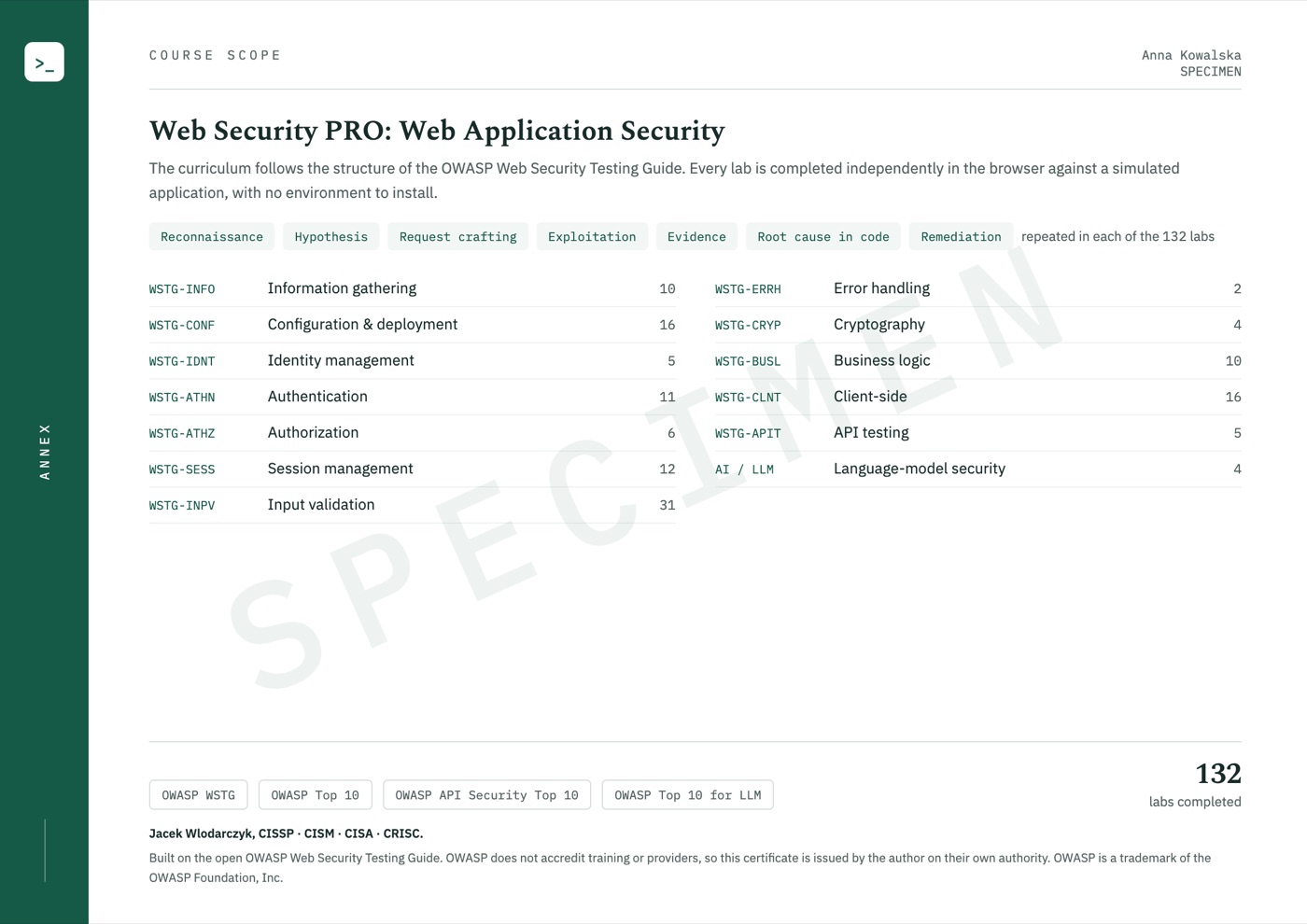
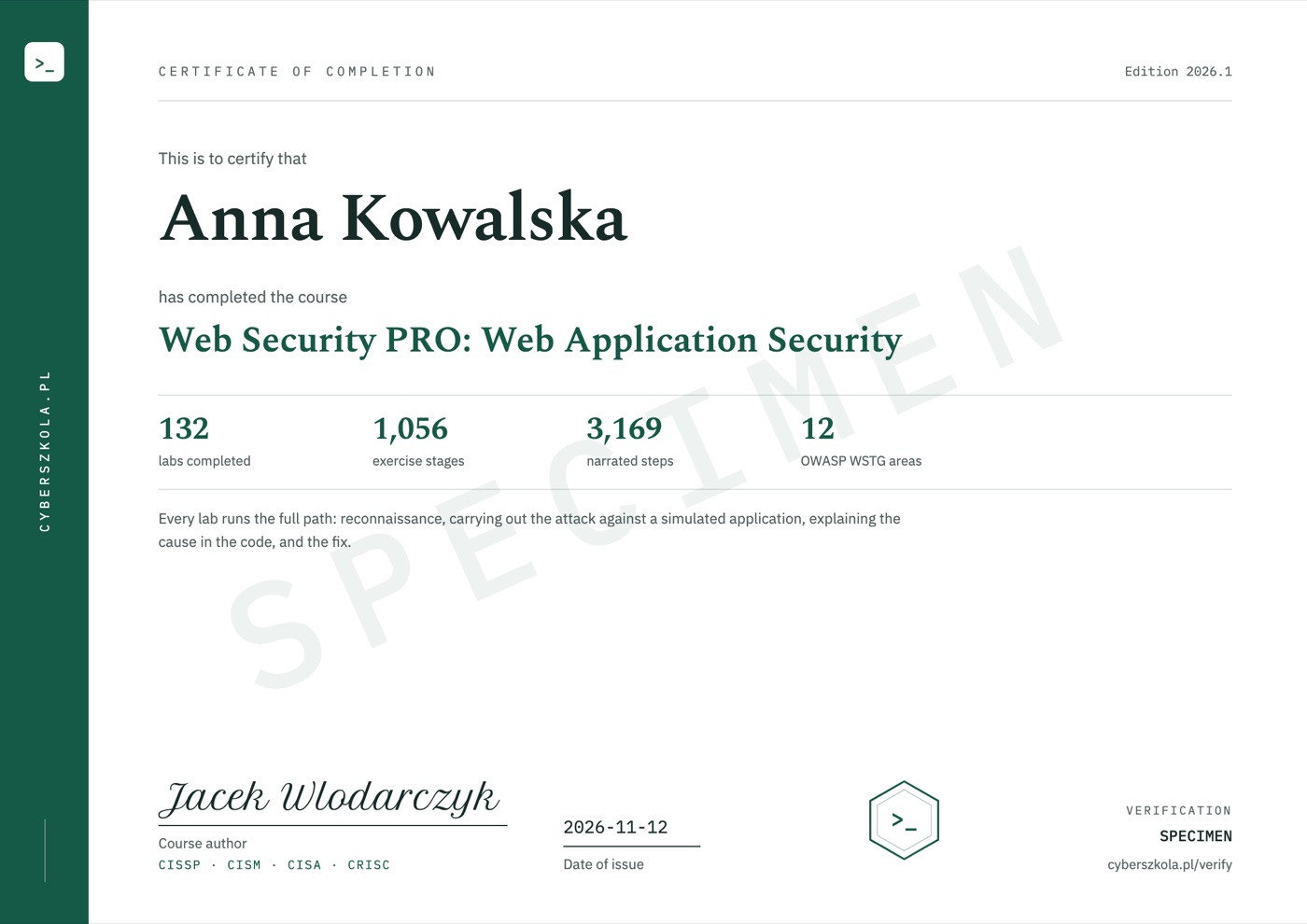
When you complete the course, the certificate is issued automatically and emailed to you. It shows your name, the date of issue and a unique code, and its second page lists the course scope.

  • Anyone, such as an employer, can check the code without logging in.
  • The certificate is issued in English.
  • It confirms completion of the course; it is not an industry certification.

Code verification: cyberszkola.pl/verify

Sample certificate of completion, page 1, with example details and a SPECIMEN watermark
Sample certificate, page 2: course scope
Sample certificate: page 1 and the course scope on page 2. The name, date and code are examples.
Enlarge course scope
Sample certificate, page 2: course scope

Web Security PRO first edition

132 labs.
One technical workshop.

  • 132 technical labs: WSTG topics and original extensions.
  • Planned access for 12 months from delivery of the entire purchased scope, with no automatic renewal.
  • Interactive guidance with a tutor, narration and browser-based tools. No Docker, VPN or local lab installation.
  • Example requests, responses and code snippets to analyze.
  • Your own experiments in the exercise modes available in each lab.
  • Reference notes for revision and a channel for reporting technical issues.
  • Certificate of completion in English, with a verification code.

Planned first-edition price

PLN 790including tax

Polish edition · Planned 12-month access

Notify me at launch

Joining is free. Before sales open, you will receive the date, full scope and purchase terms. We are not taking payments today. Separate professional-practice modules and specialist courses are not included in this price.

For companies and teams

Training for your team.
On our platform or in your LMS.

  • Company accounts, departments and licences on our platform, with progress reports for managers.
  • Delivery into your company's e-learning system. Progress and completion show up in your own reports.
  • VAT invoice issued to your company.

Compatible with LMS platforms including:

  • Moodle
  • TalentLMS
  • Cornerstone
  • Docebo
  • SAP SuccessFactors
  • Workday Learning
  • Absorb
  • 360Learning

and other platforms that support e-learning standards.

Price for companies

Individual quotedepends on the number of licences, access period and delivery method

Delivery into your company's own LMS from 50 licences.

Ask for a quote

Write to kontakt@cyberszkola.pl: the number of people, the courses you want and your LMS, if you use one.

Jacek Wlodarczyk

Project author

Jacek Wlodarczyk

Creator of Cyberwiedza, cyberszkola and AI SecLabs. In these courses, I connect explanations of mechanisms with practice, observation and decisions you need to justify.

Running a command is not enough. What matters is what its output confirms, what it does not confirm and what the next step should be.

More about the author

Before joining

Good to know.

Where should I start with no pentesting experience?

Start with the full UNION SQL injection demo. Inspect the request to view a product, the corresponding SQL query and its result. The tutor guides you through successive tests and verification of the fix. Then choose access-control, session and other injection labs. Basic familiarity with web applications and short SELECT queries will help, along with HTML and JavaScript for code examples.

Will I test vulnerabilities myself?

Yes, on prepared applications and within the mechanisms available in each lab. Compare tests, explain the effect and explore variations. The course does not guarantee finding a flaw for a real client, employment or a bug bounty reward. Testing another party's application requires appropriate permission.

Does the first edition cover an entire engagement and client report?

No. This edition focuses on technical vulnerability-testing practice. It does not include additional engagement-planning, full-reporting or CVSS modules, or an end-to-end pentest project. Web Security PRO is the course name; it does not imply inclusion of separate professional-practice modules.

Do I also need the specialist courses?

No. You are buying a standalone technical course. Upcoming specialist courses, the risk course and AI SecLabs are separate offers. They are neither required purchases nor included in the first-edition price.

Why pay when free labs are available online?

You pay for structured learning, an original environment and explanations of each action. The tutor and narration connect a test to its cause and result. You do not need to install your own lab. Try the free demo first to see whether this way of working suits you.

Am I buying a course now?

No. This is an upcoming course announcement and an interest list. Joining is not a purchase, a place reservation or a commitment to pay.

When will it launch, and what will it cost?

The launch date, price and access terms will be announced before sales open. The interest list is how we send that information.

What language will the course use?

The course is available in Polish and in English — you can switch language at any time, and lessons, exercise explanations and narration exist in both. Commands, code and tool names keep their original syntax, as used in everyday work.

Do I need to install Docker, a VPN or my own lab?

No. All course exercises run in your browser on a computer with internet access. Training applications, terminals, editors and workshops are part of the platform. You do not install Docker, a virtual machine or a VPN, and you do not need paid external tools.

Is this just a collection of videos?

No. You work in an interactive environment. A virtual tutor highlights important elements, and narration explains the action and its result. Pause the lesson, return to earlier steps and run your own experiments. This guidance is built into the course, not individual consultation with a person.

Do the exercises act on other people's systems?

No. You use training applications, simulators and prepared data. Learn the mechanism and its limitations in a safe environment. External resources are supplementary, not required to complete the exercises.

Will I receive a certificate or a job guarantee?

Yes, a certificate of completion. When you complete the course, you receive a certificate in English with a unique code that anyone can check at cyberszkola.pl/verify. It confirms completion of the course and is issued by the author; it is not an industry certification. We do not promise employment.

Are these official OWASP or ISO courses?

No. These are independently authored courses using public references and original cases. They do not replace licensed standards, accreditation or qualifications required in regulated industries.
Join the waitlist

Do not miss the launch: Web Security PRO

Leave your email address. We will send you news of enrollment, the syllabus and first-edition terms. You will not need to keep checking this page.

Planned price: PLN 790 including tax

  • Launch news for your chosen course
  • The full offer before you decide to buy
  • Free to join, no obligation to buy

Join the waitlist

Have a question? Email me

You can withdraw your consent at any time. This signup covers the selected course — we will not add you to the lists for the other courses automatically.